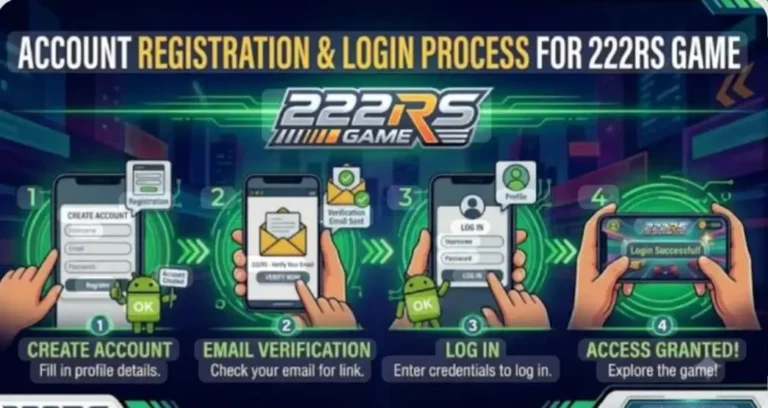
How to Withdraw Money from 222RS Game – Step-by-Step Guide 2026
So you’ve earned some balance on the 222RS game, and now you want to cash it out—that makes sense. But if you’ve already tried once and hit a wall, you’re not alone. Withdrawal issues are the number one complaint from new players, and most of the time it comes down to one or two small mistakes that are easy to fix.
In this guide, you’ll learn exactly how to withdraw money from 222RS Game step by step—whether you’re using EasyPaisa, JazzCash, or a bank account. We’ll also cover why withdrawals fail and what to do when your request is stuck on pending.
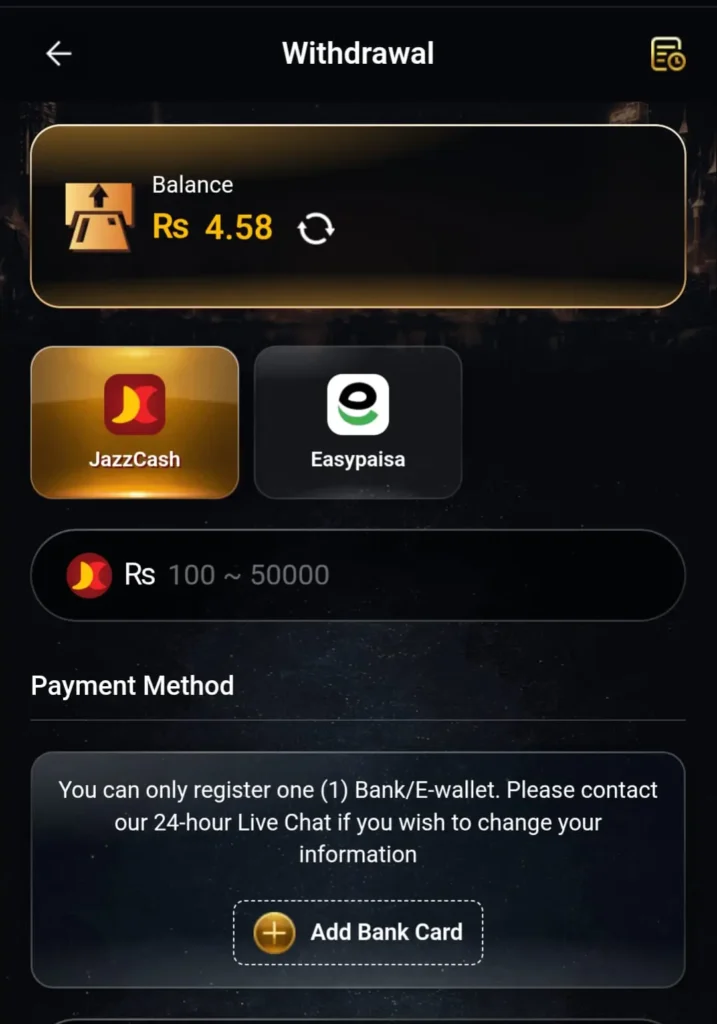
Table of Contents
Before You Withdraw – Check These Things First
Many failed withdrawals happen not because of a platform issue, but because of something the user missed before submitting the request. Save yourself the frustration by confirming these:
- Your account is verified. An unverified account often has withdrawal restrictions.
- You’ve met the minimum withdrawal limit. Most platforms in this category set a minimum—commonly between Rs. 200 and Rs. 500. Check the app’s wallet section for the exact number.
- Your payment details are correct. Your EasyPaisa or JazzCash number must match the one registered under your account and your CNIC. Even one wrong digit causes a failed transfer.
- You haven’t already submitted a pending request. Submitting multiple requests can delay or cancel each other out. Wait for one to process before sending another.
Supported Withdrawal Methods on 222RS Game
The 222RS game is built specifically for Pakistani users, so the payment options reflect that. Currently, the supported withdrawal methods are:
- EasyPaisa – the most commonly used option by 222RS players
- JazzCash – equally fast and widely supported
- Bank Transfer – available for some users depending on account level
For most players, EasyPaisa and JazzCash are the quickest and most straightforward options. Bank transfers tend to take longer and may not always be available depending on your account type.
Step-by-Step: How to Withdraw Money from 222RS Game
Here’s the exact process, broken down simply:
Step 1 – Open the App and Log In Launch the 222RS Game app on your Android device. Enter your registered mobile number and password to access your account dashboard.
Step 2 – Go to Your Wallet Once inside, look for the “Wallet” or “Funds” section. It’s usually visible on the main dashboard or inside the profile menu. Tap on it.
Step 3—Select “Withdraw” Inside the Wallet section, you’ll see two options—Deposit and Withdraw. Tap Withdraw.
Step 4 – Choose Your Payment Method: Select either EasyPaisa or JazzCash from the available options. Make sure you pick the one your registered number belongs to.
Step 5 – Enter the Amount: Type in the amount you want to withdraw. Make sure it’s above the minimum limit. Don’t enter more than your available balance either — the system won’t let the request go through.
Step 6 – Confirm Your Payment Details: Double-check the mobile number linked to your EasyPaisa or JazzCash account. This is the most critical step. If the number is wrong, your money goes nowhere — or worse, to someone else.
Step 7—Submit the Request: Hit the Confirm or Submit button. The app will show a confirmation message that your withdrawal request has been received.
Step 8 – Wait for Processing Most withdrawals are processed within a few minutes to a few hours. In some cases it can take up to 24 hours, especially during high-traffic periods or platform updates.
How Long Does 222RS Withdrawal Take?
This is one of the most common questions, and the honest answer is it depends.
Under normal conditions, EasyPaisa and JazzCash withdrawals typically process within 1 to 3 hours. Some users report receiving funds in under 30 minutes during off-peak hours. However, if there’s a platform update running, a public holiday, or heavy user traffic, it can stretch to 12–24 hours.
If it’s been more than 24 hours and nothing has arrived, that’s when you should contact support.
Common Withdrawal Problems and How to Fix Them
Problem: Withdrawal request is stuck on “Pending.” This usually means the platform is processing a high volume of requests. Give it a few hours before worrying. Don’t cancel and resubmit — that resets the queue timer.
Problem: Transfer failed or was rejected This almost always comes down to mismatched account details. Check that the mobile number you entered matches your EasyPaisa/JazzCash account exactly. Also make sure your gaming account is under the same name and CNIC as your mobile wallet.
Problem: “Minimum limit not reached” error Your balance hasn’t crossed the withdrawal threshold yet. Keep playing or check your balance again—bonus amounts and actual withdrawable balance can sometimes show differently.
Problem: Account not verified Go to your profile or account settings and complete the verification process. This usually involves submitting your CNIC number or phone verification. Without this, withdrawal options may be locked.
Problem: Didn’t receive money, but the request shows “Completed.” Wait 30 minutes, then check your EasyPaisa or JazzCash transaction history (not just your main balance). If nothing shows, contact 222RS support with your transaction ID.
Tips to Make Your Withdrawals Smoother
These are small things, but they genuinely make a difference:
- Always use your own registered SIM for the wallet number. Using someone else’s causes verification mismatches.
- Withdraw during morning or early afternoon hours — processing tends to be faster during these times.
- Keep a screenshot of every withdrawal request. If anything goes wrong, the transaction ID is your only proof.
- Don’t ignore app updates. Outdated versions sometimes have payment bugs that get fixed in newer releases.
- Start with a small test withdrawal before cashing out a large amount. It’s a good way to confirm the process works on your account before committing a bigger balance.
Is the 222RS Game Withdrawal System Reliable?
This depends on your experience with the platform and how carefully you follow the steps. Many Pakistani users report successful withdrawals when account details are correct and the minimum balance condition is met. The platform supports local wallets specifically because these work best for the target user base.
That said, like all prediction-based and reward platforms, results vary. Treat any earnings as a bonus rather than a guaranteed income. Withdraw what you earn — don’t chase losses or deposit more than you’re comfortable with.
Final Thoughts
Withdrawing from 222RS Game isn’t complicated once you know the steps. Most issues users run into come down to account verification, incorrect payment details, or not meeting the minimum limit. Nail those three things and the process becomes pretty routine.
If you’re doing it for the first time, do a small test withdrawal first. Confirm the money arrives, then proceed with larger amounts. Stay patient, keep your details accurate, and you’ll avoid 90% of the problems people commonly face.
The minimum withdrawal limit varies and may be updated periodically. Check the Wallet section inside the app for the current limit before submitting a request.
Bank transfer may be available for some account levels, but EasyPaisa and JazzCash are the primary and most reliable methods for most users.
222RS Game may have a daily withdrawal limit or a cap on the number of requests. Check your account settings or the app’s help section for the current policy.
Make sure the JazzCash account is active and not restricted. Also confirm that the name on your gaming account matches the name on your JazzCash wallet. Contact 222RS support with your request ID if the issue continues.
The app itself typically doesn’t charge a withdrawal fee, but your mobile wallet provider (EasyPaisa or JazzCash) may apply a small service charge depending on the transaction type.
Contact 222RS support immediately with your transaction ID. The faster you report it, the better the chance of catching it before it processes.